LockFit — AI Job Management & Locksmith Dispatch Platform

An internal platform that matches every client job to the best-fit local locksmith, by location, availability and skills, then coordinates scheduling, on-site confirmation and completion in one place.

Published 2026

Services

Product Strategy & UX Design

Full-stack Web Application

Development

Workflow Automation & WhatsApp Integration
Timeline

4 months

About LockFit

LockFit is one of the UK’s largest locksmith brands, delivering professional, fully qualified locksmiths to homes and businesses nationwide, 24 hours a day. Operating under Lockfit Contracts Ltd, the brand has built its reputation on fast emergency response, transparent fixed pricing and consistently high standards of workmanship.

The problem

LockFit came to us with a clear vision: replace the spreadsheets, phone calls and manual coordination behind their scheduled client work with a single system that automatically matches each job to the best-fit local locksmith and tracks it all the way through to completion.

This wasn’t a simple build. The solution needed to:

  • Ingest jobs at volume and one at a time, accept whole client spreadsheets of addresses and turn each row into a structured job, while still allowing operations to add or amend a single job by hand.

  • Turn a flat list of addresses into a workable schedule, group jobs into “runs” (a day’s work for one locksmith) automatically, rather than leaving operations to plan routes manually.

  • Match the right locksmith to every job, the heart of the system: find a locksmith who covers the area, holds the right skills, is available, and whose insurance and DBS checks are valid.

  • Coordinate with mobile field workers without friction, reach locksmiths where they already are, capture a clear accept/reject, and keep everyone informed through scheduling and reminders.

  • Keep an accurate record of the work, capture what was done at each address, when, how, and with photos, so the office has a reliable picture of every job.

  • Give head office live oversight, a single view of every run and job, with the ability to step in and re-plan when something goes wrong on the day.

What made this project complex

The heart of the system is matching, and good matching is harder than it looks. For each job the platform has to weigh location (does this locksmith cover the postcode?), availability, skill set and valid compliance all at once, then surface the best options instantly rather than leaving operations to cross-reference a roster by hand.


Around that sits a connected pipeline, not a set of separate screens. A job passes through intake, grouping, matching, the locksmith’s confirmation, on-site completion and office review, and each handover has to carry the right data forward and update status reliably, including when things go wrong: a locksmith rejecting a run, a no-answer at the door, or an expiring DBS certificate. And because the people doing the work are mobile and time-pressured, the field experience had to be lightweight and unmistakable, no portal logins, no ambiguity about what to do next.

Our approach

1. Two easy ways to get jobs into the system

LockFit’s client work comes in two shapes: big batches of jobs in a spreadsheet, and the occasional one-off. The system needed to handle both without anyone having to retype information.


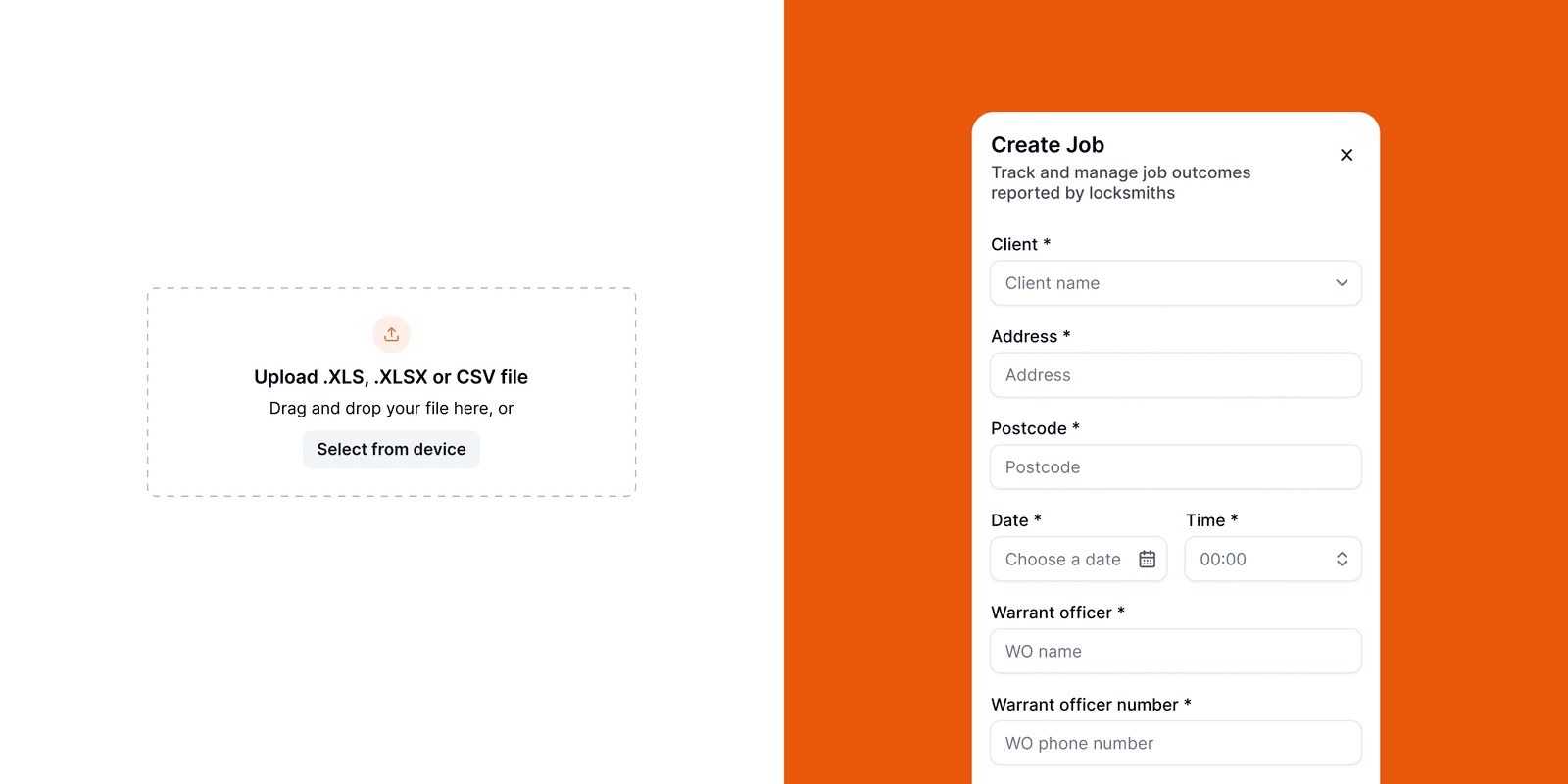
A client’s spreadsheet (.xls, .xlsx or .csv) can simply be uploaded, and the system turns each row into a job automatically. For one-offs, there’s a quick “Create Job” form with the same details: client, address, postcode, date, time, the warrant officer and their number, and any special requirements. Every upload is logged, so the team can see at a glance how many jobs and runs it created and whether it came through cleanly.


For example:

  • A 15-row spreadsheet becomes 15 jobs, automatically grouped into 5 runs.

  • Need to add something last minute? A job can be created by hand, with no file required.

2. Grouping jobs into a day’s work

A long list of addresses still leaves the hardest question unanswered: who does what, and when?


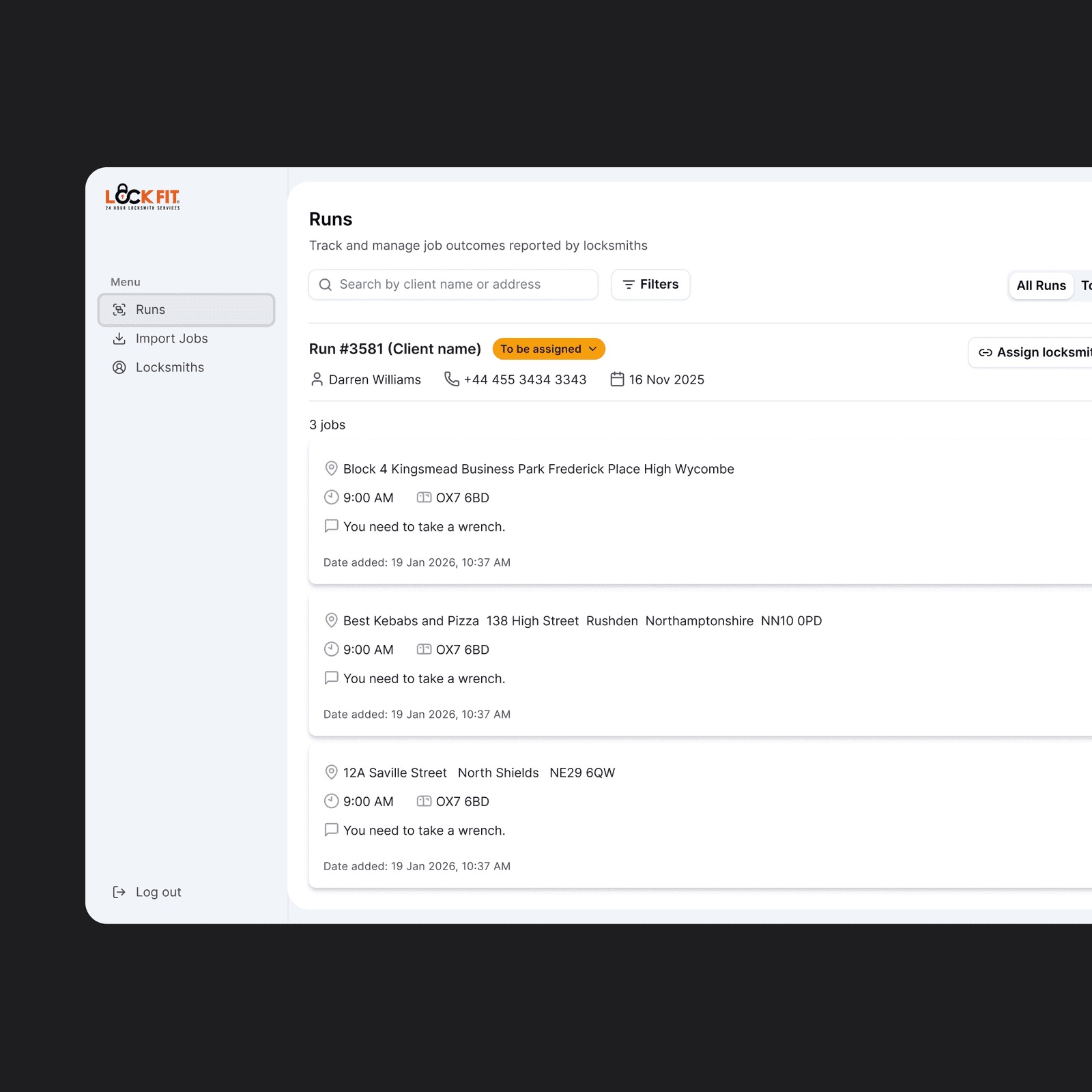
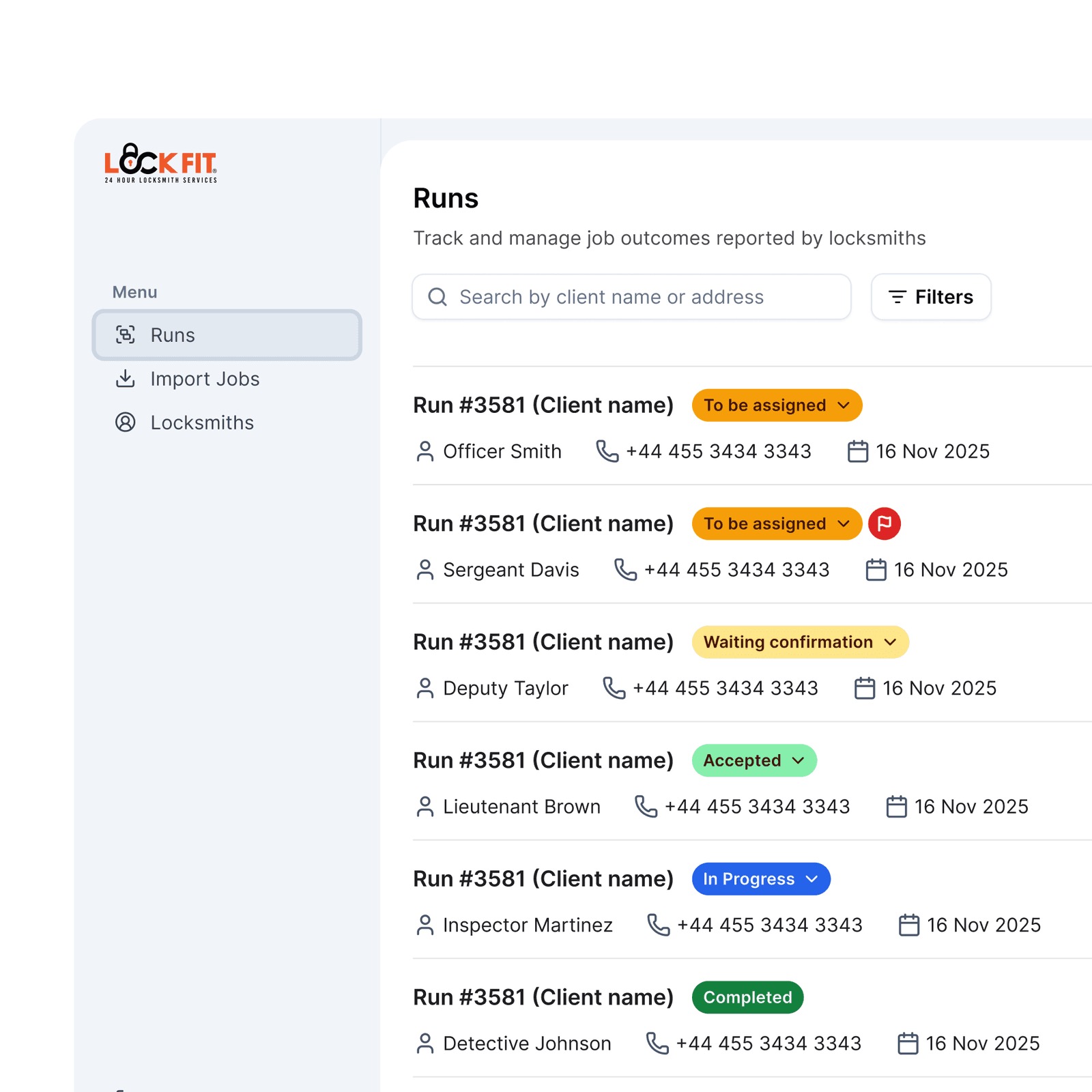
As jobs come in, the system groups them into “runs” automatically. A run is simply one locksmith’s work for a day, a set of nearby jobs on the same date, as a full or half day. The team gets instant feedback and from there, each run moves through clear stages everyone can follow.

3. A roster of locksmiths you can trust

The work is carried out by a mix of LockFit franchisees and independent subcontractors, and the right match only works if the person sent is properly qualified and up to date.


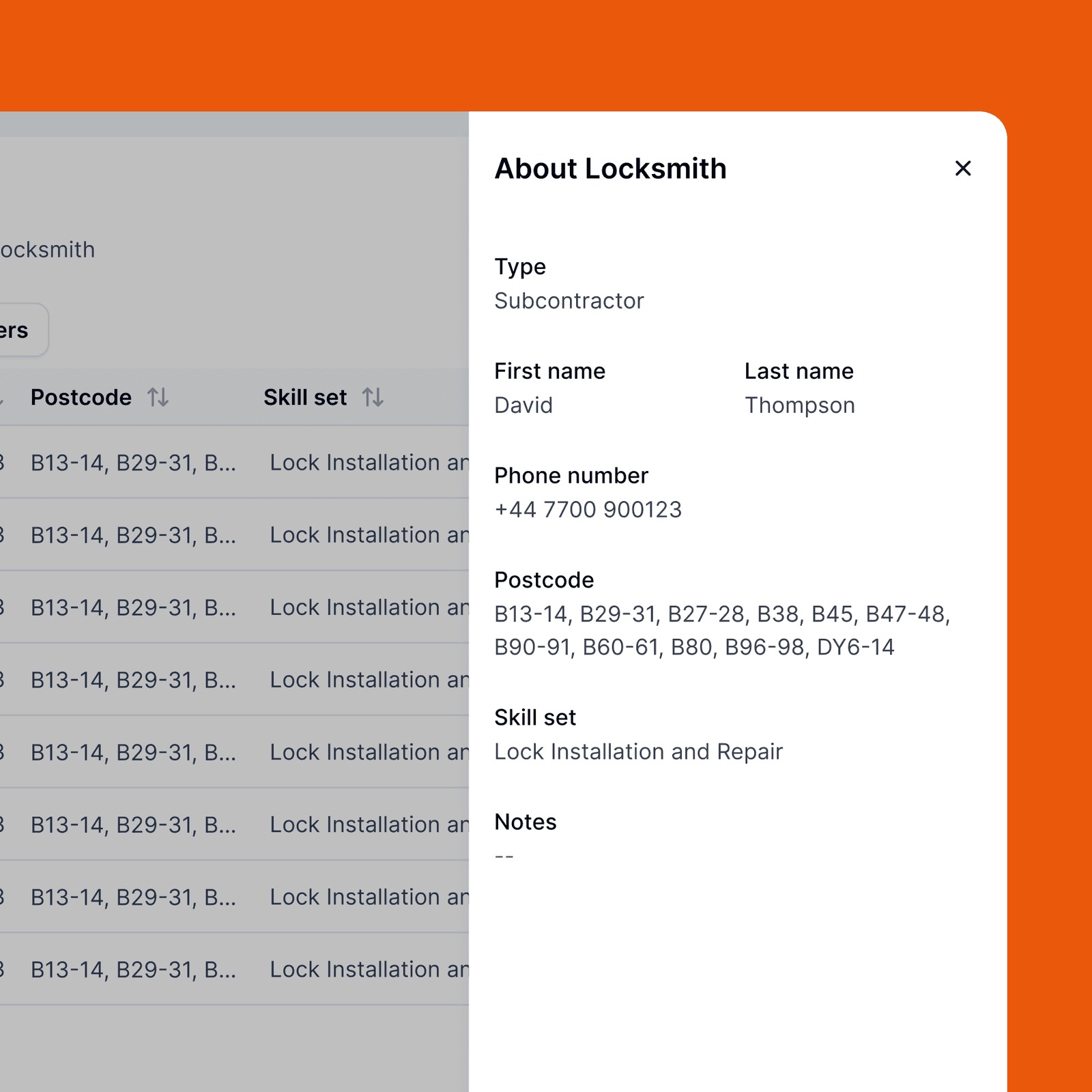
Every locksmith has a profile: whether they’re a franchisee or subcontractor, what they’re skilled in, the areas they cover, and their key documents (insurance and DBS) with renewal dates. If a document is about to expire, the system flags it early, so no one is ever sent out with lapsed cover. Skills are part of the profile too, including specialist warrant work, so warrant jobs only ever go to locksmiths qualified to do them.

4. Matching the right locksmith to the job

This is the heart of the platform. For every run, the team needs to find the best-placed locksmith fast without trawling through a list by hand.


The platform suggests the three best-matched locksmiths for each run’s area, based on their skills and availability, each one assignable with a single click. If none of those fit, the full list is a step away with simple filters by type, area or skill, and if there’s genuinely no match, the system says so clearly, so a run never quietly slips through unassigned.

5. Reaching locksmiths where they already are: WhatsApp

Locksmiths are out on the road, not sat at a desk. Asking them to log into a system to accept a job adds friction exactly where speed matters most.


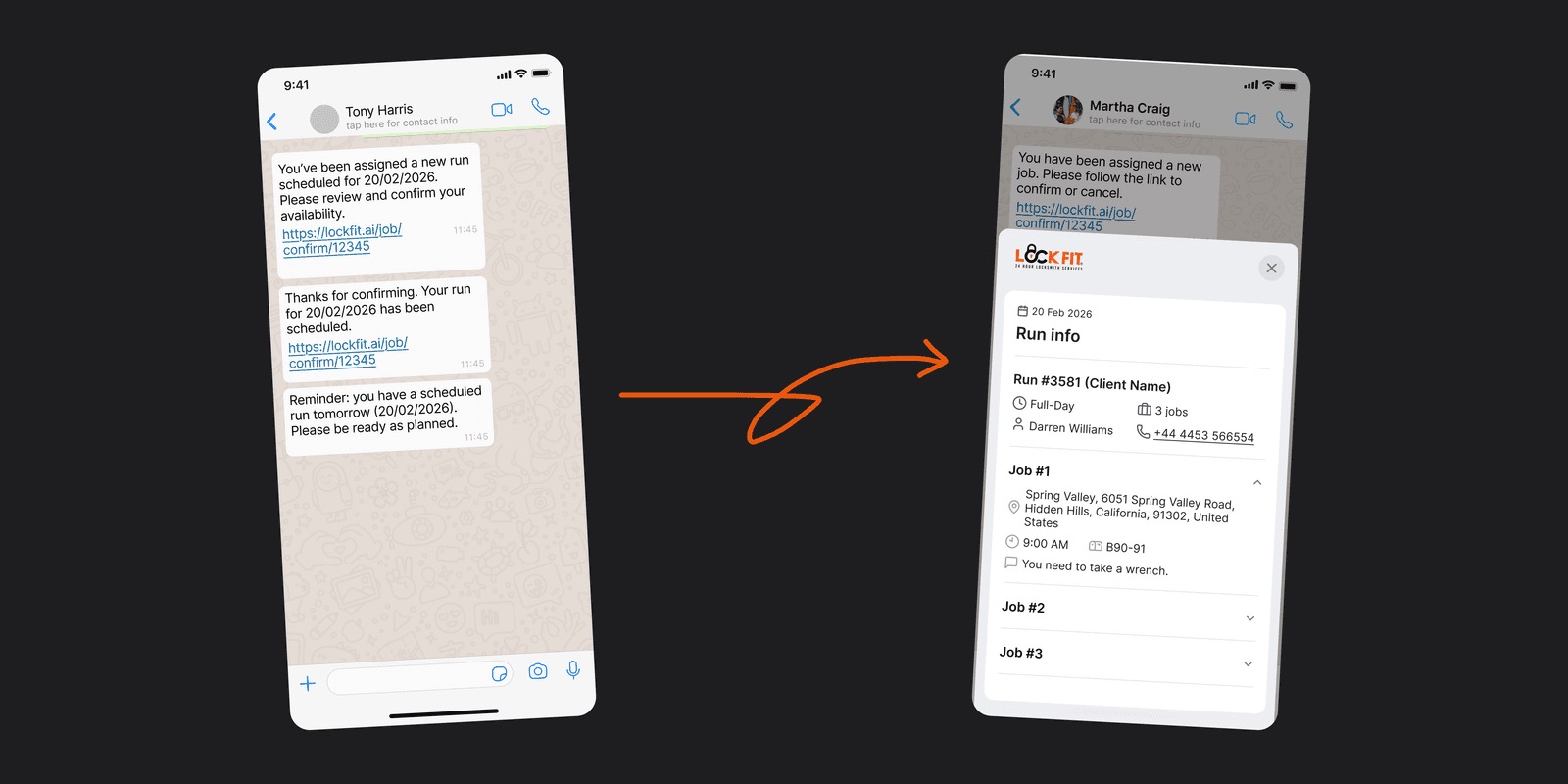
When a locksmith is assigned a run, they get a WhatsApp message with a link. Tapping it opens a simple view of the run: the date, the client, and each job’s address, time and notes, where they just tap Accept or Reject. The run updates automatically, and follow-up messages confirm the booking and remind them the day before. No app to download, no login, no guesswork.
6. Capturing what happened on site

Once the work is done, the office needs a clear, consistent record of what actually happened on every job, not a different style of note from each locksmith.


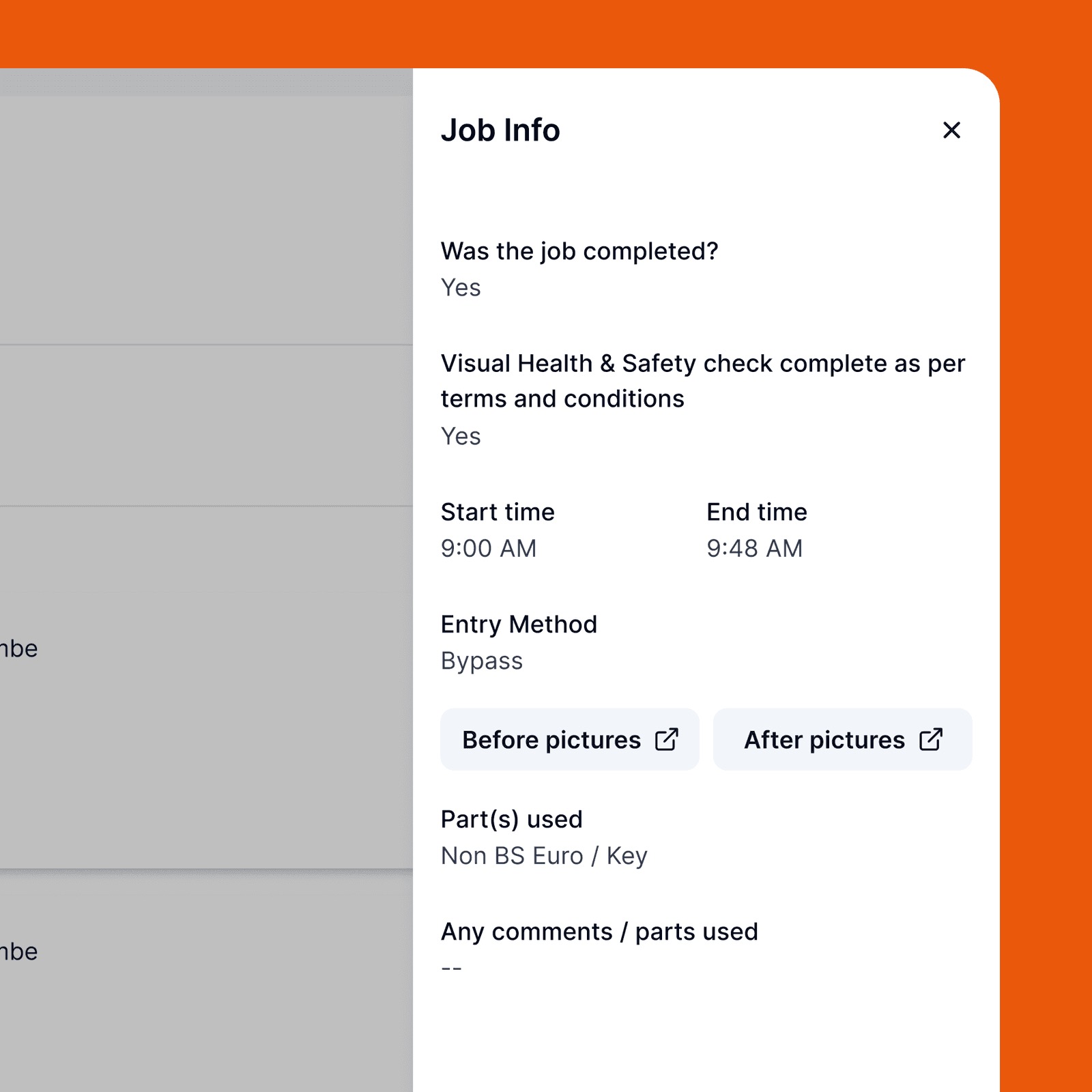
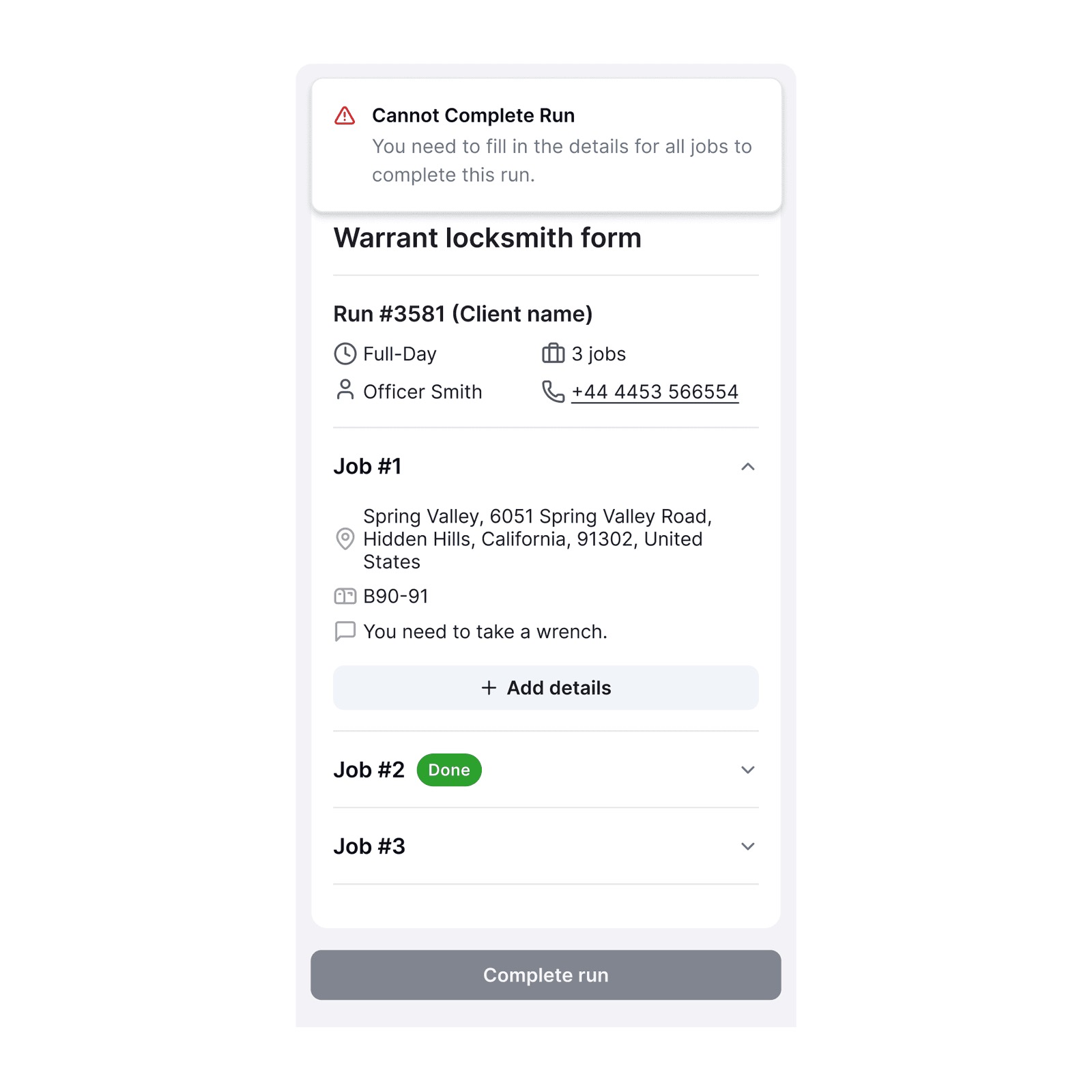
So on site, the locksmith fills in a short completion form for every job. It captures whether the job was completed, a quick health & safety check, the start and end times, how entry was made, before-and-after photos, the parts used, and any comments. If a job couldn’t be done, they note why. A run can’t be marked complete until every job has been filled in, so nothing slips through and the record is always complete. Capturing this level of detail as standard is useful across all of LockFit’s work, and it’s especially important on sensitive jobs such as warrant work, where being able to show exactly what was done, when and how, really matters.

7. Signing off the work

For every run, the office needs a clear, signed confirmation that the work was done and accepted on the day.


To close a run, the attending officer’s name and signature are captured, the locksmith sees a reminder of what to do if there’s a problem on site, and they agree to the terms and conditions before submitting. This sign-off applies to every run, giving the office a confirmed, accountable record as standard, which, again, is especially valuable for jobs such as warrant work.

8. A clear view for the office

Head office needs to see what’s happening across every run, and step in quickly when something goes wrong.


A dashboard shows every run and its status at a glance, with search, filters, and a quick way to see only the runs still needing a locksmith. For any job, the office can open the details captured on site, including photos and any reason a job wasn’t completed, and send unfinished jobs back into scheduling with a single “re-plan.” The result is one clear, up-to-date picture of every job, from the client’s first spreadsheet through to signed-off work.

Results and Impact

4 hours → 2 minutes

Scheduling and allocation

Planning routes and matching locksmiths by hand used to take up to a full day. Now jobs batch into runs automatically by date and postcode, and each run matches to a best-fit locksmith by area, skill, availability, and valid compliance. What once took most of a day takes about two minutes.

Chased by phone → 100% captured on site

Job evidence and reporting

This project was delivered over the course of 4 months, covering everything from early discovery and prototyping through to rigorous testing and full deployment.

Tech specs

Frontend

  • Framework – React 19 + Vite — SPA with client-side routing via React Router v7, responsive layouts for mobile and desktop

  • UI Library – Radix UI primitives (Select, Checkbox, Label, Slot) with Lucide React icons — shared component system across individual and organisation flows

  • Styling – Tailwind CSS v3 — utility-first styling with custom design tokens for the ACT® brand (#1FAD42 green, domain-specific accent colours)

  • AccessibilityaccessibilityPrefs.js preferences layer; large touch targets and high-contrast design — essential for the older adult user base

  • Forms – React Hook Form v7 + Zod v4 validation — multi-step registration and assessment flows with field-level validation and state persistence

  • State / Data – TanStack Query v5 for server state; Zustand v5 for client-side global state

  • Internationalisation – i18next + react-i18next — localisation-ready across all user-facing strings

Backend & Authentication

  • Runtime – PHP 8.2+ / Laravel 12 — REST API, queue workers, and scheduled jobs running as separate ECS Fargate task definitions

  • Database – MySQL 8.0 on AWS RDS (gp3, encrypted at rest, Multi-AZ in production, 7-day automated backups)

  • Auth – Laravel Sanctum (token-based) — individual user sessions and organisation-scoped professional accounts with role-based access control (Admin / Assessor) via Spatie Laravel Permission

  • 2FA – TOTP-based two-factor authentication with QR code enrolment and audit-logged enable/disable events

  • API layer – REST — versioned JSON API with Axios on the frontend; TanStack Query managing cache, retries, and background refetching

  • Admin approval workflow – Custom invitation queue with organisation-scoped role assignment; approval events recorded to the audit log with IP address and user agent — enforcing clinical governance at account level

  • PDF generation – barryvdh/laravel-dompdf — assessment reports rendered server-side and stored to S3

  • Spreadsheet export – PhpSpreadsheet — bulk participant data exports for organisation administrators

Multi-Tenancy & Organisation Model

  • Org ID system – Unique shareable identifiers for team onboarding — allowing organisations to invite assessors without a centralised invite link

  • Role-based access – Admin and Assessor roles with separate permission sets, dashboards, and account management capabilities (Spatie Laravel Permission)

  • NHS identity – Organisation branding support including logo upload (S3-backed) and NHS trust display — with organisation type categorisation for reporting and routing

  • Tenant isolation – All queries are organisation-scoped at the application layer; assessment data, participant profiles, and audit logs are partitioned by organisation_id

  • Questionnaire templates – Organisations can create and assign custom assessment templates and campaigns; results are scoped to the owning organisation

  • Matching engine - Map-based, distance-sorted PA search with tag filtering (e.g. mobility, dementia support) and a highlighted best-match recommendation

  • Mapping - Google Maps

  • Search & filtering - Easy-to-search lists for PAs, Support Seekers, Sessions, Payroll, Invoices, and Tags, with flexible filtering

  • Reliability - Automatic retries that keep payments and messages from being lost during a brief outage with Stripe, Xero, or Twilio

Infrastructure & Compliance

  • Hosting – AWS ECS Fargate (eu-west-2 — London) — containerised backend with Application Load Balancer, auto-scaling task definitions for web and queue workers

  • CDN – AWS CloudFront — serving the React SPA and uploaded assets (logos, PDFs) from S3 via Origin Access Control; ACM certificates in us-east-1

  • Storage – AWS S3 — persistent file storage for uploads; Laravel public disk transparently switches to S3 in production via FILESYSTEM_DISK=s3

  • Cache / Queue – AWS ElastiCache Redis 7 — Laravel queue driver and cache store; AI recommendation results cached for 24 hours

  • Secrets – AWS Secrets Manager — app key, DB password, and OpenAI API key injected at ECS task startup

  • Data consent – Explicit mandatory + optional consent collected at assessment start, versioned by consent_text_version — GDPR-aligned with timestamp and immutable audit trail

  • Audit logging – AuditLog model records actor, action, affected model, old/new values, IP address, and user agent for all clinical data access and admin approval events

  • Infrastructure as Code – Terraform — modular layout (vpc, rds, ecs, s3, elasticache, cloudfront, alb, route53, acm) with separate test and production environment configurations

  • Hosting - Azure

  • Auth - Secure login with role-based access, so people only see what's relevant to them, Azure MSAL, Microsoft/Azure AD auth

  • Compliance - GDPR and UK Data Protection Act alignment; signed data agreements with every third-party service; systemised right-to-work, DBS, and identity verification checks

  • Monitoring - Centralised monitoring that helps the team quickly spot and track down any issues across the platform

Dev Experience & Tooling

  • Language – TypeScript 5.9 (frontend) / PHP 8.2 (backend) — strict typing end-to-end across a dual-user, multi-tenant data model

  • Testing – PHPUnit 11 (backend unit + feature tests); frontend build validation and ESLint on every PR

  • CI/CD – GitHub Actions — ci.yml runs backend PHPUnit + frontend lint/build on every PR to main/develop; separate deploy-test.yml and deploy-prod.yml pipelines push to ECS on merge

  • Code quality – ESLint 9 + Prettier (frontend); Laravel Pint (backend) — enforced in CI with zero-warning policy

  • Local dev – composer run dev boots PHP API, queue worker, log tail, and Vite dev server concurrently

  • Language - TypeScript

  • CI/CD - Automated checks and testing before every release, with safe, zero-downtime deployments and a 5-minute automatic rollback if anything goes wrong

  • Testing - Jest  and Vitest 4 

  • Code quality - ESLint 9 + typescript-eslint , Prettier Husky + lint-staged — pre-commit hooks

Built by Green Republic

Built by Green Republic

Let’s build together

Tell us about your project or reach us at

Follow us on Socials.

Let’s build together

Tell us about your project or reach us at

Follow us on Socials.

Let’s build together

Tell us about your project or reach us at

Follow us on Socials.